How to Get Your Logo Ready for Hat Embroidery
You don't need a designer to order custom hats. Send us what you have and we'll handle the rest. That said, a few things make a big difference in how your logo turns out in thread.
Quick answer
- Send a vector file (AI, SVG or PDF) if you have one. A sharp PNG or JPG works too.
- Keep text at least about 1/4 inch tall and lines bold.
- Digitizing is free, and you get a mockup within 48 hours.
What file to send
- Best: a vector file like AI, SVG or PDF. It stays sharp at any size.
- Also fine: a high-resolution PNG or JPG, ideally with a transparent or plain background.
- Size limit: up to 10 MB per file on our order form, one file per location.
- No file? You can skip the upload and email it to help@threadbreak.com after you order.
What digitizing is
An embroidery machine can't read a picture. Your logo has to be redrawn as a stitch file that tells the machine every stitch, its direction and its color. That's called digitizing, and it's free with every order. Many shops charge for it, often per logo.
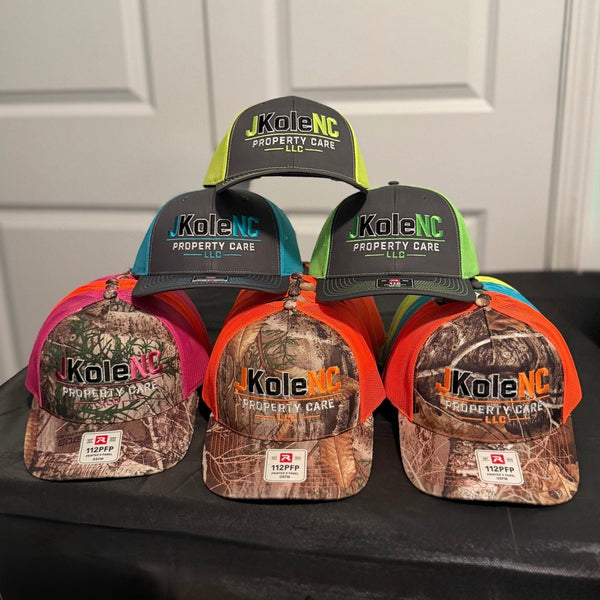
The hats at the top of this guide are a good example: a detailed, multi-color logo that still stitches clean because it was digitized for hat size.
What stitches well
- Bold shapes and thick lines. Thread has width, so very thin lines can disappear.
- Text at least about 1/4 inch tall. Smaller than that and letters start to blur together.
- Solid colors. Thread comes in solid colors, so gradients, glows and shadows can't be reproduced the same way.
- Fewer tiny details. A logo that looks great on a business card may need simplifying at hat size.


If your logo is very detailed, a laser engraved leather patch holds fine lines and small text much better. See leather patch vs embroidered hats, or our full embroidery guide.
Thread colors
We match thread colors to your logo by default. Want something different, like tone-on-tone (black on black) or a color that matches the hat? Add it to the order notes.
Tip: Ask your AI tool for a flat vector logo with 2 to 4 solid colors and no gradients. It saves a lot of back and forth.
Using AI artwork
AI-generated logos often look fine on screen but aren't ready to stitch. They tend to have gradients, tiny textures, warped letters and blurry edges. If you're making one, ask the tool for a flat, simple logo with 2 to 4 solid colors, thick outlines and no shadows or 3D effects. Send it either way. If it needs to be recreated before digitizing, we'll tell you and quote any fee before anything is made.
What to expect
Within 48 hours you'll get a digital mockup showing your logo's size and placement on the hat. It's a layout preview, not a photo of the finished hat. Embroidery is a physical process, so small differences from the screen are normal. Thread colors can look a little different in person, stitches have texture, and placement can shift slightly from hat to hat. Some logos also need small adjustments to stitch well, like thicker lines or a simpler detail. You'll see every change on your free mockup before anything is made.
Ready? Upload your logo and start an order, or check our FAQ.